Generating OG images in Astro
How this blog builds Open Graph cards at build time with Satori and resvg.
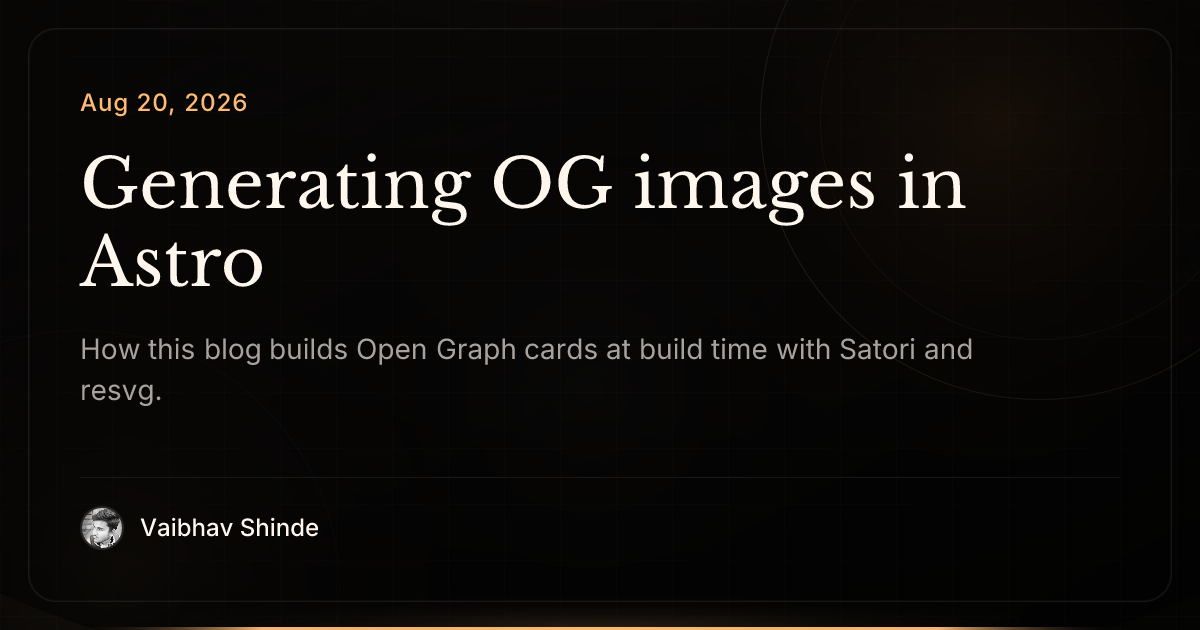
Every post on this site gets a share card for free. No Figma export, no hand-written PNGs. The image is generated when the site builds.
I prefer build time over an on-demand API route with caching. This blog is
small, so rendering a PNG per post barely shows up in the build. Posts only
change when I deploy anyway, so paying for compute on the first crawler hit (and
worrying about cache keys, cold starts, and stampedes) is wasted work. A static
PNG on the CDN is cheaper for me, always warm, and the first share is as fast as
any other asset. It also keeps @resvg/resvg-js in Node at build time instead of
fighting native addons or WASM on the edge.
Build time fits when the set of cards is known up front and grows slowly: a personal site, docs, a marketing page per release. I’d reach for an on-demand route if cards were user-generated, previewed before publish, or numbered in the thousands with a build budget I cared about.
The endpoints
There are two routes:
/og.pngfor the site-wide card (home, listing pages)/blog/[slug]/og.pngfor each post
Both are Astro API routes with prerender = true, so they become static PNGs in
dist/. The per-post route walks the content collection and passes title,
description, and date into the renderer:
export const prerender = true;

export const getStaticPaths = (async () => {
  const posts = await getVisibleBlogPosts();

  return posts.map((post) => ({
    params: { slug: post.id },
    props: {
      title: post.data.title,
      description: post.data.description,
      date: formatOgDate(post.data.pubDate, post.data.updatedDate),
    },
  }));
}) satisfies GetStaticPaths;

export const GET: APIRoute<Props> = async ({ props }) => {
  const png = await renderOgPng({
    title: props.title,
    description: props.description,
    date: props.date,
  });

  return pngResponse(png);
};
The site-wide /og.png route is the same idea with fixed title and description.
Satori, then resvg
The pipeline:
- Satori turns a JSX layout into SVG
- resvg rasterizes that SVG to PNG at 1200×630
export async function renderOgPng(input) {
  const [fonts, avatarSrc] = await Promise.all([
    loadOgFonts(),
    loadAvatarDataUrl(),
  ]);

  const svg = await satori(ogTemplate({ ...input, avatarSrc }), {
    width: 1200,
    height: 630,
    fonts,
  });

  const resvg = new Resvg(svg, {
    fitTo: { mode: 'width', value: 1200 },
  });

  return resvg.render().asPng();
}
Fonts are read from @fontsource (Inter + Libre Baskerville), same families the
site uses. The avatar is the profile photo, cached as a data URL so Satori can
draw it without a network fetch.
The template
Satori accepts a limited subset of HTML/CSS, written as JSX. Everything is inline styles, and flexbox is the main layout tool. A simplified version of the card looks like this:
/** @jsxImportSource satori/jsx */

export function ogTemplate({ title, description, date, avatarSrc }) {
  return (
    <div
      style={{
        width: '100%',
        height: '100%',
        display: 'flex',
        flexDirection: 'column',
        justifyContent: 'space-between',
        padding: 80,
        backgroundColor: '#0c0a09',
        color: '#fff7ed',
      }}
    >
      <div style={{ display: 'flex', flexDirection: 'column', gap: 28 }}>
        <div style={{ display: 'flex', fontSize: 24, color: '#fdba74' }}>
          {date}
        </div>
        <div
          style={{
            display: 'flex',
            fontSize: 60,
            fontFamily: 'Libre Baskerville',
            lineHeight: 1.15,
          }}
        >
          {title}
        </div>
        <div
          style={{
            display: 'flex',
            fontSize: 28,
            fontFamily: 'Inter',
            color: '#a8a29e',
          }}
        >
          {description}
        </div>
      </div>

      <div
        style={{
          display: 'flex',
          alignItems: 'center',
          gap: 16,
          fontFamily: 'Inter',
          fontSize: 24,
        }}
      >
        <img
          src={avatarSrc}
          width={44}
          height={44}
          style={{ borderRadius: 9999 }}
        />
        Vaibhav Shinde
      </div>
    </div>
  );
}
The real template adds background glows, a light grid, borders, and title
scaling when the string gets long. Satori is picky: use real elements instead of
fragments for layered backgrounds, and stick to display: 'flex' on almost
everything.
Colors and sizing live in one theme object, so tweaking the look is a single file change.
Wiring it into pages
Each post page points its Open Graph and Twitter image meta tags at the generated path:
const image = `/blog/${post.id}/og.png`;
// → <meta property="og:image" content="https://vaibhavshn.com/blog/.../og.png" />
This post uses that same URL as its heroImage, so the card in the header is
the one social platforms get when the link is shared.